


🆕 xTool C1 Color Cutter: the new plotter that prints, scans, and cuts
🆕 xTool C1 Color Cutter: the new plotter that prints, scans, and cuts
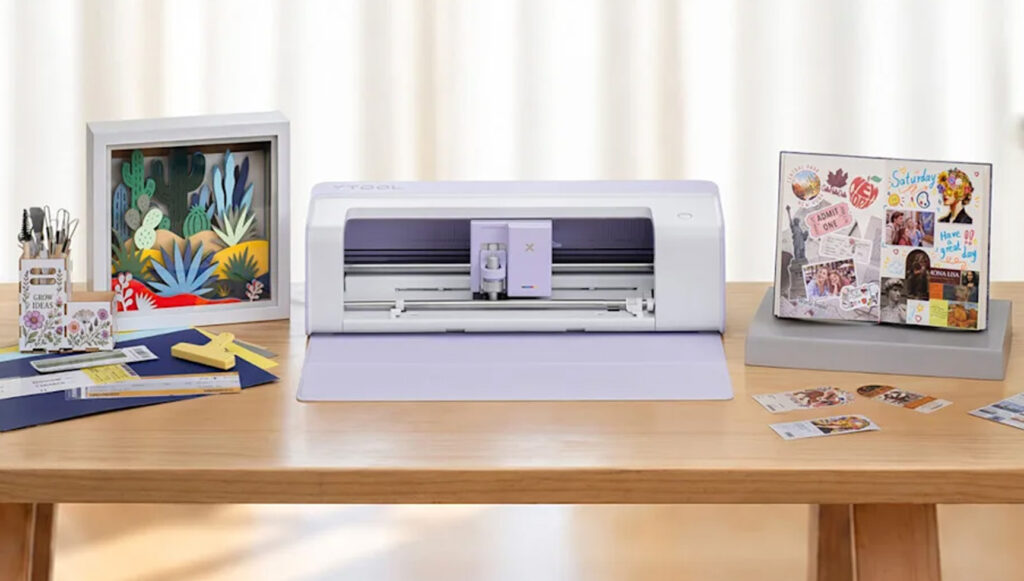
xTool presents its new multifunction cutting plotter: the xTool C1 Colour Cutter. This machine combines a scanner, full-colour printing and precision cutting in a single unit to simplify customisation tasks.
Unlike traditional plotters, it allows you to print and cut designs without the need for an external printer or registration marks. This is an especially interesting solution for professionals working with stickers, vinyl, creative stationery, and textile customization.
And it will soon be available at Brildor! We will tell you what you can do with it and its main features.
ÍNDICE
- What is the xTool C1 Color Cutter?
- What makes the xTool C1 Color Cutter different?
- Much more than cutting: drawing, foil, and embossing
- Printing with DURA inks: stickers and textile customization
- What can you create with the xTool C1 Color Cutter?
- Atomm: AI-assisted design
- Frequently Asked Questions about the xTool C1 Color Cutter
- xTool C1 Colour Cutter coming soon to Brildor!
What is the xTool C1 Color Cutter?
The xTool C1 Colour Cutter is a cutting plotter with an integrated CMYK inkjet printer and CIS scanner. It combines three common customisation processes in a single machine: scanning, printing and cutting.
Its main advantage is that it allows for complete printing and cutting tasks to be carried out without moving the material between different machines.
Additionally, it supports interchangeable tools to expand its functions and perform tasks such as marking, drawing, foil stamping, and embossing.
What makes the xTool C1 Color Cutter different?
1. Full-colour printing and cutting without registration marks
One of the main innovations of the C1 is its ability to print full-colour designs and cut them with the same machine.
Use CMYK inkjet printing, with a maximum resolution of 720 × 1200 dpi, to reproduce photographs, illustrations, and logos.
By integrating both processes, it eliminates the need to use registration marks, making better use of the material's surface.
For example, you can print a sheet of stickers with different designs and cut out each figure without changing equipment. It also allows you to create multicoloured designs without layering different sheets of vinyl, by using compatible printable media.

2. Integrated scanner for positioning designs
The C1 incorporates a CIS scanner (Contact Image Sensor) that recognises the surface of the material and displays a 1:1 scale preview in the software.
This way, you can place the designs on the material before starting the cutting.
Additionally, it includes features that facilitate work preparation:
- Automatic contour detection: identifies the shapes of printed drawings or designs for cutting them out
- Scrap Utilisation: allows you to place new designs on the free areas of the scanned material.
- Cutting multiple pieces in a single session: makes it easier to distribute designs on different material pieces placed on the mat.
- Recognition via QR codes: automatically applies the working parameters for compatible official materials
These functions help to optimise material usage and simplify the preparation of the cuts.
3. Cutting of materials up to 3 mm thick
However, the C1 not only prints. Thanks to its interchangeable blades, it can also cut different materials:
- Paper and cardstock: cards, invitations, and boxes
- Adhesive vinyl: stickers, labels and graphics
- Textile vinyl: designs for personalising garments using heat transfer
- Fabrics: felt, canvas, denim, and other compatible materials
- Leather: small pieces and personalised accessories
- Balsa wood and cardboard: structures and creative stationery projects
- Flexible Magnetic Sheets: shapes and decorative elements
With the appropriate cutting blade and a compatible adhesive mat, you can cut materials up to 3 mm thick, depending on their characteristics.
Much more than cutting: drawing, foil, and embossing
The xTool C1 also supports interchangeable tools for performing other customization techniques:
- Drawing with markers: create illustrations, outlines, and text
- Crease marking: prepare fold lines on cards and boxes
- Foil Stamping: add metallic details using transfer tools
- Embossing: creating recessed or raised designs using specific tools
It also offers accessories such as the electrostatic mat, which holds lightweight materials without adhesives, and the roll holder, designed for working with continuous materials. Accessories are sold separately. Their inclusion will depend on the selected configuration or package.
Printing with DURA inks: stickers and textile customization
The DURA Pigment Inks by xTool allow for the creation of waterproof stickers and fade-resistant designs on compatible materials, according to the manufacturer.
For textile customisation, you can print on compatible transfer paper and apply the design with a heat press. xTool claims a durability of up to 30 washes for textile applications made with their consumables and proper procedures.
It also allows for direct printing on certain pre-treated fabrics and on materials such as wood or acrylic, using the recommended primer.
It is important to remember that this is not a DTF or sublimation printer, but rather an inkjet system with its own consumables and requirements.
What can you create with the xTool C1 Color Cutter?
The combination of printing and cutting opens up different possibilities for customisation businesses:
- Custom Stickers: full-colour designs, business labels, and specially shaped adhesives
- Custom packaging: product labels, thank you cards, and boxes
- Textile Customisation: T-shirts and bags using printable transfers or textile vinyl
- Creative stationery: invitations, cards, envelopes, and scrapbooking projects
- Events and Celebrations: personalised details, decorative elements, and promotional items
- Accessories: leather pieces, fabrics, and flexible materials for various projects
An interesting option for workshops that work with on-demand orders, small batches, or different customised products.
Atomm: AI-assisted design
The xTool C1 Colour Cutter is compatible with Atomm, the creative platform by xTool that incorporates AI-assisted design tools through AImake.
Among its functions are the generation of designs from text or images, background removal, the creation of decorative texts, and the conversion of images into paths.
It also allows for the preparation of stationery projects, three-dimensional figures, and other designs ready for customization.
These tools facilitate the preparation of files and the creation of new proposals for different products.

Frequently Asked Questions about the xTool C1 Color Cutter
What is the xTool C1 Colour Cutter?
It is a multifunction cutting plotter that combines a colour inkjet printer, a CIS scanner and cutting using interchangeable blades.
Does the xTool C1 print and cut without registration marks?Yes. Its integrated system allows you to print full-colour designs and cut them without registration marks, making alignment and material utilisation easier.
What materials can the xTool C1 cut?It can cut paper, cardstock, adhesive vinyl, heat transfer vinyl, fabrics, leather, cardboard, and balsa wood, among others. Compatibility depends on the blade used.
Can T-shirts be customised with the xTool C1?Yes. It allows you to print designs on compatible transferable materials to be applied later with a heat press. It can also cut conventional textile vinyl.
Is the xTool C1 a laser cutting machine?No. It uses interchangeable blades to cut materials and does not perform laser engraving.
What differentiates the xTool C1 from a conventional plotter?It integrates full-colour printing and material scanning, in addition to cutting. This allows for complete print and cut jobs without the need for an external printer.
xTool C1 Colour Cutter coming soon to Brildor!
If you're looking to expand the possibilities of your business, the new C1 combines colour printing, scanning, and cutting with interchangeable tools in a single device.
The xTool C1 Colour Cutter will be available at Brildor very soon! Stay tuned for updates on its availability and the different purchasing options.
If you have any questions, please share them with us in the comments. Our team will be delighted to provide you with answers and assistance. You can also contact our Customer Services department directly for further help.
Remember that on our social media, we publish a wide range of ideas, offers, and the latest news related to various personalisation techniques daily. To stay updated with everything, follow us on Instagram and TikTok. And don't forget to subscribe to our YouTube channel to continue learning with us!
See you in the next post!
👇 Other articles that may be of interest to you:
🆕 Cricut Joy 2 and Cricut Explore 5: What really changes compared to their previous versions?

🆕 Silhouette launches its new cutting plotters: CAMEO5α and CAMEO5α PLUS
⚕️How to care for your cutting plotter to make it last longer
🤷♀️Silhouette Curio vs Silhouette Cameo: differences and alternatives
WE WANT TO KNOW WHAT YOU THINK
You may also like